
ExifCleaner 4.0 is the first major release of the privacy focused metadata removal tool in five years. Rebuilt from the ground up, the new version adds recursive folder cleaning, a before and after metadata inspector, safer file preservation options, 25 interface languages, and major security improvements.
Photos and other digital files can reveal far more than their visible content. EXIF and other embedded metadata may contain GPS coordinates, device information, timestamps, camera settings, software details, and other information that you may not intend to share.
ExifCleaner 4.0 provides a free, open source way to remove that information locally on macOS, Windows, and Linux.
What is ExifCleaner 4.0?
ExifCleaner is a desktop application for viewing and removing metadata from supported files. It uses ExifTool for metadata processing but provides a graphical interface, allowing users to clean files without entering terminal commands.
Version 4.0 is not a small visual refresh. According to the project, the application has been completely rebuilt while retaining its original privacy focused approach.
New to the application? Our previous ExifCleaner overview explains the original drag and drop workflow. ExifCleaner 4.0 keeps that approachable foundation while adding considerably more control over how files are processed.
| Application | ExifCleaner 4.0.0 |
|---|---|
| Purpose | Inspect and remove metadata from supported files |
| Platforms | macOS, Windows, and 64 bit Linux |
| Price | Free |
| License | MIT open source license |
| Processing | Local processing without uploading files to an online service |
| Major new features | Folder processing, metadata inspection, preservation controls, 25 languages, and a redesigned interface |
Why should you remove EXIF metadata?
Metadata is information stored in or associated with a digital file. It can help software organize, display, and process that file, but it can also expose details that the person sharing it never considered.
Depending on the file, device, and software involved, metadata may contain:
- The make and model of a camera or phone
- The date and time a photo was taken
- GPS coordinates or location information
- Camera exposure and lens settings
- The software used to create or edit the file
- Author, creator, or copyright information
- File creation and modification dates
- Comments, descriptions, and embedded previews
Not every metadata field is dangerous. Orientation information can keep a photo upright, while an ICC profile can help preserve accurate colors. The privacy concern arises when a shared file contains information that its owner did not intend to disclose.
A publicly shared photograph, for example, might expose where it was taken, when it was captured, and which device created it. Cleaning the file before uploading it reduces the amount of hidden information attached to it.
What is new in ExifCleaner 4.0?
Clean entire folders recursively
ExifCleaner 4.0 can process an entire folder rather than requiring users to select every file manually.
Drop a folder into the application and ExifCleaner will look for supported files inside it, including files stored within its subfolders. This can save a substantial amount of time when cleaning:
- Complete photo exports
- Website media folders
- Product image collections
- Client delivery folders
- Research documents
- Archived projects
- Social media content batches
Folder processing is one of the most useful additions in version 4.0, particularly for photographers, publishers, researchers, and anyone who regularly works with large collections of files.
Before processing an important folder, review the application settings and make sure you have an independent backup of anything that cannot be replaced.
See exactly which metadata was removed
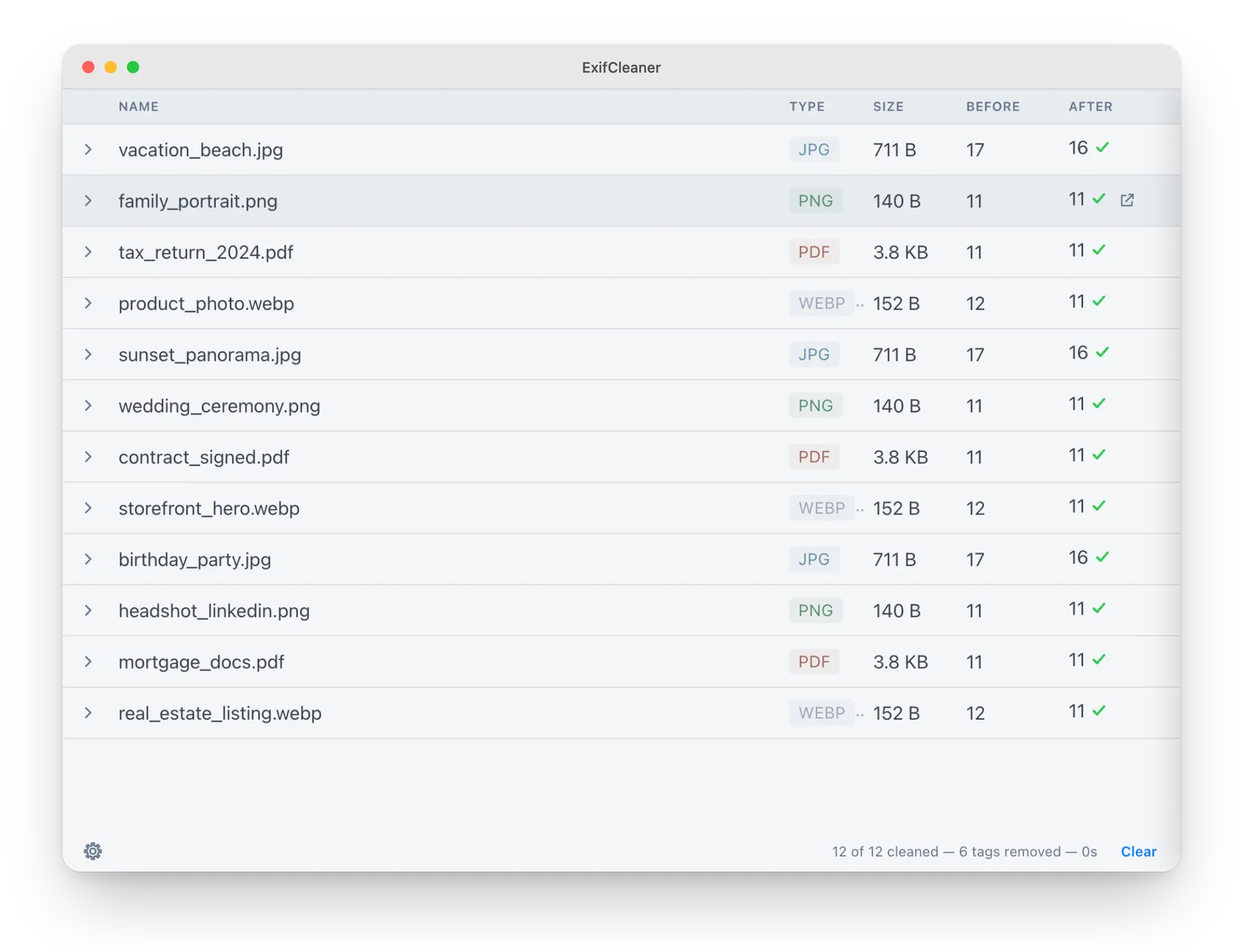
ExifCleaner 4.0 includes a metadata inspector that displays a before and after comparison for each processed file.
After cleaning a file, you can select it to see which metadata tags were removed. This is more informative than a generic success message and makes it easier to verify what the application changed.
The inspector may be especially useful for journalists, photographers, researchers, and technical users who need to confirm that sensitive fields have been removed.
Preserve photo orientation
Some photographs depend on an orientation tag to tell software how the image should be displayed. Removing that tag can cause an otherwise unchanged photo to appear sideways or upside down.
ExifCleaner 4.0 can preserve photo orientation while removing other metadata. The official release notes state that this option is enabled by default, helping photos remain upright after cleaning.
Save the cleaned file as a copy
Users can now create a cleaned copy instead of overwriting the original file.
When the Save as copy setting is enabled, ExifCleaner creates a separate file with _cleaned added to its filename. The original remains available with its existing metadata.
This is a safer option for many workflows because it lets you:
- Compare the cleaned file with the original
- Recover information that was removed accidentally
- Keep a private archival copy
- Share sanitized versions without modifying source files
- Test different settings before processing an entire collection
Preserve original file timestamps
Cleaning a file can alter the creation or modification dates recorded by the operating system.
ExifCleaner 4.0 introduces an option to preserve those original file timestamps. This can help maintain chronological sorting, archive organization, and workflows that depend on file dates.
File system timestamps are not necessarily the same as date fields embedded inside a photo or document. Preserving the former does not mean that every embedded date field will remain in the cleaned file.
Preserve the embedded color profile
The new settings panel can preserve an image’s ICC color profile while removing other metadata.
ICC profiles help compatible software display colors accurately. Removing one can change how an image appears between applications, screens, or printing workflows.
This option gives photographers, designers, and publishers a better balance between privacy and consistent color reproduction.
Remove macOS extended attributes
Files stored on macOS may carry extended attributes outside their ordinary embedded metadata. These can include quarantine information and data used by Spotlight.
ExifCleaner 4.0 includes a macOS specific setting for removing these extended attributes, extending the cleaning process beyond conventional EXIF fields.
A completely redesigned interface
Version 4.0 replaces the previous interface with a modern React based design.
The redesigned application includes:
- A centralized settings drawer
- A status bar showing processing progress
- Processed file counts
- A count of removed metadata tags
- A before and after metadata inspection view
- Dark mode that can follow the operating system
- Manual theme selection
- In application language switching
These changes are more than cosmetic. The new interface provides clearer feedback while files are being processed and places the most important privacy controls in one location.
ExifCleaner now supports 25 languages
ExifCleaner 4.0 is available in 25 interface languages and lets users change the language from inside the application. There is no need to change the language used by the operating system.
Languages added since ExifCleaner 3.6.0 include Catalan, Croatian, Czech, Danish, Hungarian, Malayalam, Persian, Polish, Brazilian Portuguese, Slovak, Swedish, Turkish, and Vietnamese.
In application language switching makes the tool easier to use on shared computers, multilingual systems, and devices where the system language should remain unchanged.
Major security improvements under the hood
The visible features are only part of the ExifCleaner 4.0 rebuild.
The application has moved from Electron 11 to Electron 35, incorporating several years of Chromium security updates. Its interface now runs inside a sandbox and is designed without direct access to the file system or operating system.
The release also introduces schema validation for internal communication between different parts of the application.
These architectural changes reduce the level of access available to the visible interface. That is particularly relevant for software designed to inspect files that may have originated from cameras, downloads, clients, or unfamiliar third parties.
The project also says every commit is automatically tested across macOS, Windows, and Linux through its continuous integration and delivery system.
Local processing with no telemetry
According to the official release notes, ExifCleaner continues to generate zero network traffic. The project says the application contains no telemetry, automatic update checks, or phone home functionality.
Files are processed locally instead of being uploaded to an online metadata removal service.
Local processing offers several practical benefits:
- Private files do not need to be sent to another company
- An internet connection is not required for cleaning
- Upload speed does not limit large batches
- Confidential or unpublished files can remain on the computer
- The source code is publicly available for inspection
Local software is not automatically secure simply because it works offline. You should still download ExifCleaner from its official release page, verify the download when appropriate, and keep your operating system protected.
After cleaning a file, you may also want to avoid uploading it to a cloud service simply to move it between devices. LocalSend provides a free, open source, and cross platform way to transfer files over a local network.
Faster processing for large batches
The ExifCleaner project states that the application can process hundreds of files in seconds.
Actual performance will depend on the computer, storage device, file formats, file sizes, and selected settings. The practical improvement in version 4.0 is that users can combine fast batch processing with recursive folder selection and clearer progress information.
What file types does ExifCleaner support?
ExifCleaner uses ExifTool for its metadata processing and is designed to work with supported image, video, document, and media formats.
That can include common photos, camera files, WebP images, videos, PDFs, and other formats for which ExifTool supports metadata writing.
Support can vary by format, and not every type of metadata can necessarily be removed from every file. Test an expendable copy before processing an uncommon format or a professionally important source file.
Linux users comparing graphical metadata removal applications can also read our Metadata Cleaner guide. Metadata Cleaner offers another visual approach to inspecting and cleaning metadata on Linux.
ExifCleaner 4.0 downloads
ExifCleaner 4.0 provides separate downloads for several operating systems and installation formats.
| Platform | Available download |
|---|---|
| macOS on Apple Silicon | ARM64 DMG |
| macOS on Intel | Intel DMG |
| Windows | Installer or portable executable |
| Linux | AppImage |
| Debian and Ubuntu | DEB package |
| Fedora and RHEL | RPM package |
Download ExifCleaner 4.0 from the official GitHub release page.
The developers specifically warn users to download ExifCleaner only from the project’s GitHub releases page. Builds distributed through other channels are not verified by the project.
Why does macOS or Windows show a warning?
ExifCleaner 4.0 is not code signed, so macOS and Windows may display a security warning the first time it is opened.
The developers explain that signing certificates require payment and a verified legal identity. Because ExifCleaner is anonymously maintained as a privacy project, they decided not to make that tradeoff.
An unsigned application is not automatically malicious. However, the absence of a signature removes one mechanism that an operating system can use to confirm a publisher’s identity.
That makes it particularly important to obtain ExifCleaner from the official release page and verify the supplied SHA 256 checksum.
Opening ExifCleaner on macOS
On macOS 14 Sonoma and earlier, Control click or right click the application, select Open, and then confirm the action.
On macOS 15 Sequoia and later, first attempt to launch the application and allow macOS to block it. Then open System Settings > Privacy & Security, find the ExifCleaner warning, and select Open Anyway.
Opening ExifCleaner on Windows
Windows Defender SmartScreen may display a message stating that Windows protected your PC.
After confirming that the file came from the official ExifCleaner release page, select More info and then Run anyway.
Opening ExifCleaner on Linux
The Linux AppImage must be marked as executable before it can run:
chmod +x ExifCleaner-4.0.0.AppImageThe Debian and Ubuntu package can be installed with:
sudo apt install ./exifcleaner_4.0.0_amd64.debThe Fedora and RHEL package can be installed with:
sudo dnf install ./exifcleaner-4.0.0.x86_64.rpmHow to verify an ExifCleaner download
Every ExifCleaner 4.0 download has a corresponding SHA 256 checksum listed in the release’s SHASUMS256.txt file.
A checksum lets you confirm that your downloaded file is byte for byte identical to the artifact produced by the project’s build system. This can reveal a corrupted or substituted download.
The project also says its release artifacts are built publicly through GitHub Actions. The automated release process installs and launches the generated application, then tests metadata removal before the build can be published.
Important: A checksum does not independently prove that an application is safe or audit its source code. It verifies that the file you received matches the file produced by the stated build process.
Who should use ExifCleaner 4.0?
Photographers
Photographers can remove location, device, editing, and capture information before publishing or delivering images. Orientation, file timestamps, and color profiles can be preserved when required.
Journalists and researchers
People handling sensitive material can inspect removed fields and process files locally without uploading them to a third party metadata service.
Metadata removal does not make a potentially malicious document safe to open. When working with unfamiliar PDFs, Office documents, or images, consider using a separate tool such as Dangerzone to convert potentially dangerous documents into safer PDFs.
Content creators
Creators can clean batches of images before uploading them to social networks, websites, forums, communities, or online marketplaces.
Designers and agencies
The save as copy option makes it possible to produce sanitized deliverables while retaining original source files and internal metadata.
Businesses and organizations
Teams can clean directories of media or documents before public distribution. Organizations should still test the application against their own security, legal, and records management requirements.
Everyday users
Anyone sharing photographs or other files publicly can use ExifCleaner to reduce unintended metadata exposure without learning ExifTool commands.
Should you upgrade from ExifCleaner 3?
ExifCleaner 4.0 is a substantial upgrade rather than a routine maintenance release.
The update introduces:
- A newer Electron foundation
- A sandboxed interface process
- Validated internal communication
- Recursive folder support
- A before and after metadata inspector
- File preservation settings
- A redesigned interface
- Expanded language support
- Automated cross platform testing
- SHA 256 checksums for release downloads
Users of an older release should still test version 4.0 with copied files before making it part of an important production or archival workflow.
Important privacy limitations
ExifCleaner is a useful privacy tool, but removing metadata is not the same as becoming anonymous.
A metadata cleaner cannot conceal information that is visibly present in a photograph. Before publishing a sensitive image, inspect it for faces, license plates, addresses, computer screens, documents, reflections, and recognizable locations.
A separate blur tool can help censor faces and other identifiable information before an image is shared.
A cleaned file may still reveal information through:
- Its visible contents
- Recognizable people or locations
- Reflections, signs, or screens shown in a photo
- The filename
- The account or message used to share it
- Copies stored elsewhere
- Information generated by the receiving platform
Metadata removal should be one part of a wider privacy process. Inspect the visible content, rename sensitive files when necessary, review account privacy settings, and check the cleaned output before publishing it.
Frequently asked questions
Is ExifCleaner 4.0 free?
Yes. ExifCleaner is free and released under the MIT open source license.
Does ExifCleaner upload photos to the internet?
According to the official release notes, no. ExifCleaner processes files locally and generates zero network traffic. The developers say it contains no telemetry, automatic update checks, or phone home functionality.
Can ExifCleaner remove metadata from an entire folder?
Yes. Version 4.0 supports recursive folder processing. You can drop a folder into the application and process supported files inside that folder and its subfolders.
Does ExifCleaner overwrite the original file?
It can, but version 4.0 also includes a save as copy option. When enabled, ExifCleaner creates a separate file with _cleaned added to its name.
Will removing metadata rotate my photo?
ExifCleaner 4.0 can preserve the orientation tag needed to display a photo correctly. According to the official release notes, orientation preservation is enabled by default.
Can ExifCleaner preserve image colors?
Version 4.0 includes an option to retain an embedded ICC color profile. This helps compatible software maintain consistent color presentation after other metadata has been removed.
Can I see what metadata ExifCleaner removed?
Yes. The new metadata inspector provides a before and after view showing which tags were removed from each processed file.
Does ExifCleaner work on Apple Silicon Macs?
Yes. Version 4.0 provides separate native macOS downloads for Apple Silicon and Intel computers.
Is ExifCleaner available for Windows and Linux?
Yes. Windows users can choose an installer or portable executable. Linux users can choose an AppImage, Debian or Ubuntu package, or Fedora or RHEL package.
Why is ExifCleaner unsigned?
The developers say code signing certificates require payment and disclosure of a verified legal identity. The project’s anonymous maintainers decided that this was not an acceptable tradeoff for a privacy focused application.
Where should I download ExifCleaner?
Download ExifCleaner only from the project’s official GitHub releases page. The developers state that builds distributed through other channels are not verified by the project.
Final verdict
ExifCleaner 4.0 makes metadata removal more transparent, flexible, and practical.
Recursive folder processing makes large cleaning jobs easier. The metadata inspector shows exactly what changed. Preservation controls help prevent unwanted image rotation, timestamp changes, color differences, and accidental loss of original files.
The rebuilt application also introduces a newer security foundation while retaining the qualities that made ExifCleaner useful in the first place: local processing, no telemetry, cross platform availability, and open source code.
ExifCleaner cannot solve every privacy risk associated with sharing a file, but it can remove a significant category of hidden information before that file leaves your computer.
Download ExifCleaner 4.0 from the official GitHub release page
