


We’ve touched on this before, but it’s time for this trick to be revisited for macOS Sierra. There are plenty of gestures for Magic Trackpads, the Magic Mouse and MacBooks designed specifically to make your life easier.
Some of them are enabled by default, some of them you can change in your System Preference, and some of them are not enabled at all. Jump over the break to check out how you can enable a secret scroll gesture that will reveal what windows are open in an app.
So what exactly does this gesture do? Well, once enabled you can do an upward two-finger swipe over an app icon in the dock to reveal all its windows.
For example, check out the photo above. There are 3 Safari windows opened but, let’s say, that two of them were minimized. Instead of going to your dock, click and holding on the Safari icon to see the windows, you can now just do an upward two-finger swipe over the icon.
How to enable the gesture:
1. Open up Terminal (Applications > Utilities)
2. Type and hit enter: defaults write com.apple.dock scroll-to-open -bool true; killall Dock
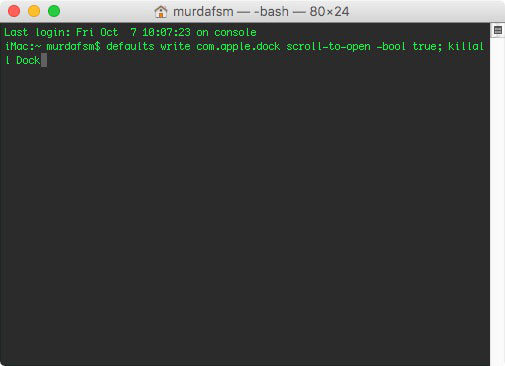
3. That’s it.Now, when you swipe over any icon in your dock you’ll see all the open windows associated with that app. Swipe fown to return to normal.
To disable the gesture do the exact same thing but instead of “true”, type “false”. So the command will be defaults write com.apple.dock scroll-to-open -bool false; killall Dock
