


Apple wants to create one big ecosystem where all your Apple devices can work together. That’s a great way to boost productivity but, unfortunately, not everything works like it should. Not yet at least.
Take Reminders app. Ever noticed that, sometimes, your reminders don’t quite sync across macOS and iOS? Luckily there’s an easy fix for that.
Jump over the break to learn how to enable the Debug menu in Reminders app and force a manual update….
ALSO READ HOW TO: Enable Safari’s Hidden “Debug” Menu and Force Sync iCloud History
1. Quit Reminders
2. Open Terminal and type: defaults write com.apple.reminders RemindersDebugMenu -boolean true
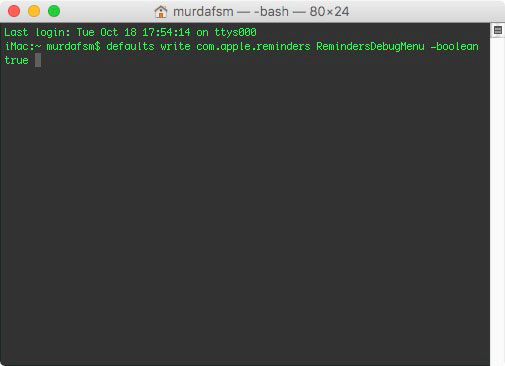 3. Hit return ( enter )
Now when you open up Reminders, you will find the Debug menu in the Reminders’ menu bar which will give you the option to manually sync with iCloud.
NOTE: to disable the Debug menu, open up Terminal and type in defaults delete com.apple.reminders RemindersDebugMenu
